Indexing Standard.site
A journey to index a new standard for content publishing and why it matters

For decades the internet has been a place to make your voice heard, and the cornerstone for most of that time has been blogs. Even in the rise and fall of social media, blogs continue to have their place in the internet. RSS, as old as it sounds, has also been proven to help connect and keep up with people and their content. However these two pieces of technology have one main problem: distribution. Back in the day, webrings and blogrolls were attempts to help cover this gap, but social media and algorithms became the default way to get that distribution.
Thankfully, atproto is paving a different path. Instead of using the old platforms owned by the 1%, people are building solutions that are owned by everyone. One community built solution is Standard.site, a set of JSON schemas known as lexicons that finally give hope to solving the content distribution problem. When a blog, or any app for that matter, uses the Standard.site lexicons, the published content can be indexed by just about anyone. That index can be used to build so many mechanisms for distribution, and none of it is controlled by one individual or organization. You can control how you explore and consume that content.
This promise of blogs finally getting a new wave of uninhibited distribution truly excited me, and I saw the possibilities at hand for not just blogs, but any kind of social app that has shared content and lexicons. Of course I started hacking away, first by building my own publishing mechanism on my website, then slowing building tools like Sequoia that help anyone with static blogs publish to the same shared network. Naturally I also wanted to see how I could tap into the final state: indexing, the bridge that promised freedom. I eventually completed this mission with a fun app with a feed called docs.surf. This post goes into a journey to index Standard.site lexicons, the challenges, and how a great community can come together and push the boundaries further.
The Challenges
It turns out that indexing Standard.site documents in particular has several noteworthy challenges.
Publications
Each blog post that is turned into a site.standard.document record also contains a site.standard.publication referred to as the site:
{
  "$type": "site.standard.document",
  "site": "at://did:plc:abc123/site.standard.publication/3lwafzkjqm25s",
  "path": "/blog/getting-started",
  "title": "Getting Started with Standard.site",
  "description": "Learn how to use Standard.site lexicons in your project",
  "coverImage": {
    "$type": "blob",
    "ref": {
      "$link": "bafkreiexample123456789"
    },
    "mimeType": "image/jpeg",
    "size": 245678
  },
  "textContent": "Full text of the article...",
  "tags": ["tutorial", "atproto"],
  "publishedAt": "2024-01-20T14:30:00.000Z"
}
This is important, because while the document might have the main content of the blog post, it doesn’t have the full canonical URL of the blog with its post. The textContent or content fields are not required, so at the very least we need a link to the post. It has a path, but we need to combine it with the site.standard.publication record’s url property to make a complete link:
{
  "$type": "site.standard.publication",
  "url": "https://standard.site",
  "icon": {
    "$type": "blob",
    "ref": {
      "$link": "bafkreiexample123456789"
    },
    "mimeType": "image/png",
    "size": 12345
  },
  "name": "Standard.site Blog",
  "description": "Documentation and updates about Standard.site lexicons",
  "preferences": {
    "showInDiscover": true
  }
}
That means if we want to properly index Standard.site, we need to first grab the document, then grab the publication.

So lets say someone has the document AT URI (something like at://did:plc:ia2zdnhjaokf5lazhxrmj6eu/site.standard.document/3mii2k5x4hd2h) then we need to make a total of two API requests at minimum. Not bad, but it gets a bit more complicated.
Verification
To quote the Standard.site docs:
Since Standard.site records reference domains and web pages, a verifiable way for these resources to point back to their corresponding records is needed.
We want to make sure that a record for a post is actually from the author of that site. This necessary verification is achieved two ways:
- A publication record returned from
/.well-known/site.standard.publicationon the publication site - A document record returned as a
<link>tag in the post header
If you’re keeping track, that means we now need to:
- Request the
site.standard.documentrecord so we can get the publication record - Request the
site.standard.publicationrecord to get the URL of the site - Request the publication verification
- Request the main post URL for the document verification
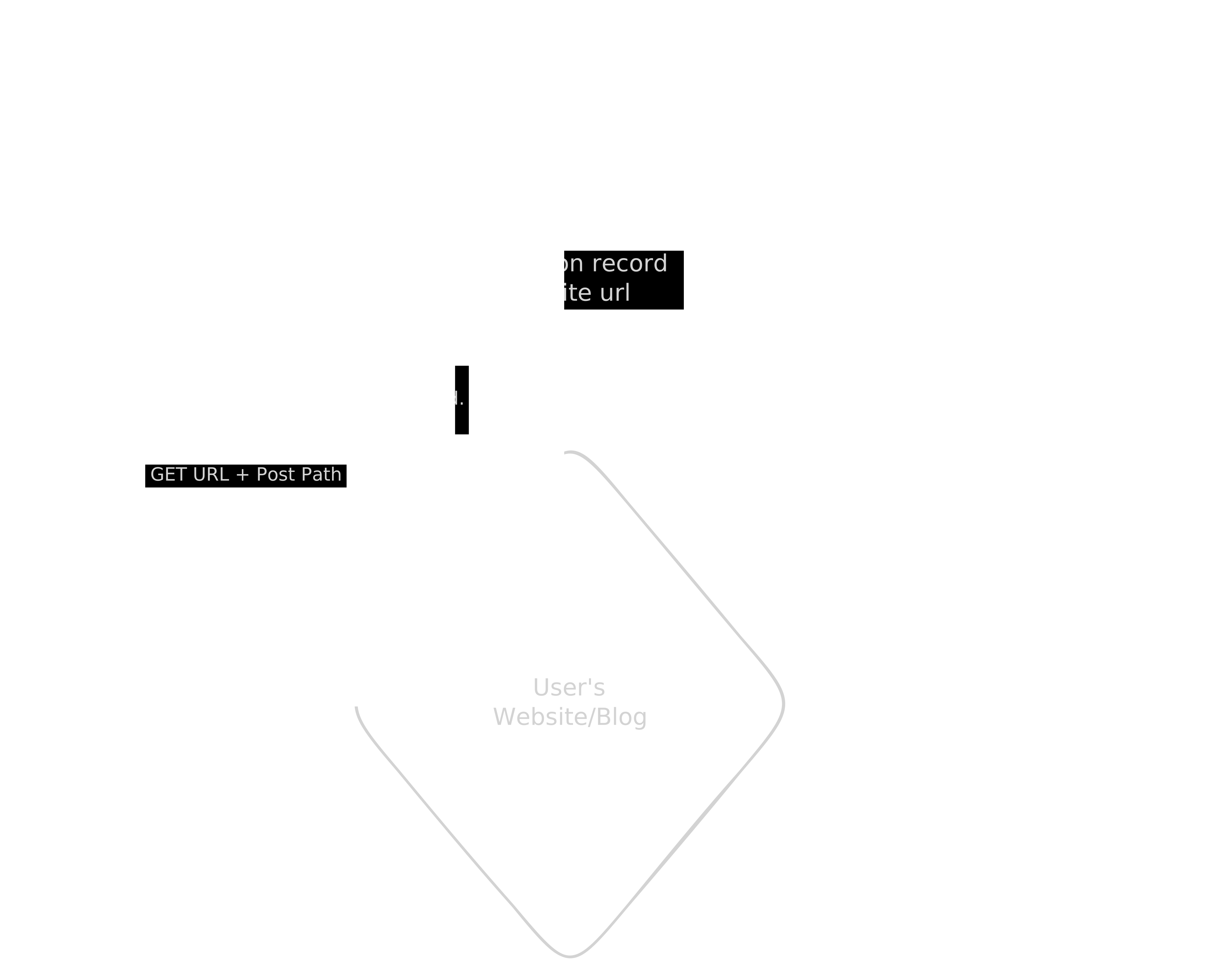
You can start to see why this is slowly growing in complexity, and unfortunately it only gets worse (we’ll get to that later). For now, you can get an idea of what we need to do and the challenges at hand. Let’s start talking about some of the solutions I cycled through.
Tap + Client
From a little bit of research, I found that Tap seemed to be the default service you can host to start indexing content on atproto. It gives you the ability to only index a specific record (in our case, site.standard.document), and it can even backfill to a specific cursor. Spinning it up is pretty straight forward, so in no time at all I was starting to fill a database with events that pointed to site.standard.document record.
After starting to gather in some records, I thought it was worth seeing how bad the rendering might be client side to start before dedicating to a more complicated setup. Sure enough, putting an API layer on top of Tap and then doing the other multitude of API requests on top of that to fetch all the information we mentioned earlier, was just way too slow. It wouldn’t serve the purpose of docs.surf: rendering a feed of blog posts from the atmosphere. Back to the drawing board.
Tap + Cloudflare
At first I thought I could build a service around Tap and a self hosted server that could help with making the extra API calls, but it ended up being a bit more complicated than expected. One piece of that complexity was the rate that documents started coming in. Since Tap will backfill posts, it will run at quite a rapid pace and start filling the database quickly. If you want to try to make those additional requests necessary to build the necessary objects and verification, you’re likely going to run into bottleneck issues.
Another issue I found was during my development of Sequoia. If you want to implement Standard.site into your static blog, you have to publish the document records for the blog post first so you can get the AT URI, and then deploy the blog with the appropriate <link> tags for verification. That means there is likely going to be a slight delay between the record creation on the PDS and when the site is built and deployed with that information, so if you try to verify a document right after it was published, you’ll get a false negative.
From previous experience I knew that Cloudflare had the perfect solutions for both of these problems, particularly queues. Thankfully Tap has a nice webhook solution built into the service that lets you send a payload when a valid event is received. In no time at all I had the following architecture:
- Tap running on Railway sends webhook to Cloudflare worker
- Cloudflare worker sends payload to queue
- Queue handles the multiple requests to resolve the records and verification
- Queue stores data in D1 database
- Cron job runs to re-check records that were initially marked as not verified
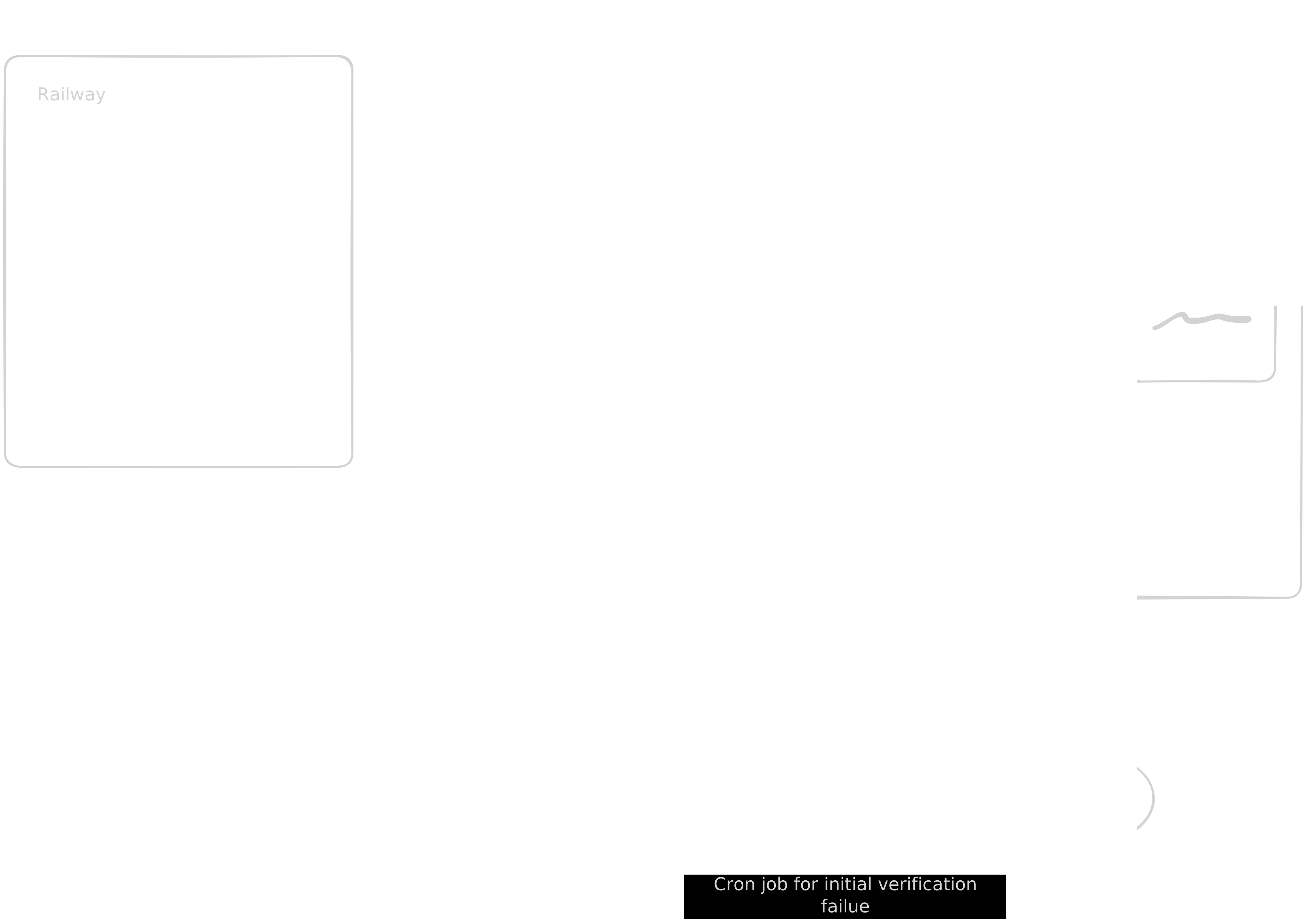
Overall this flow worked pretty well! Docs.surf was born and I was able to build a front-end that could make API calls to the worker which would query the database for complete Standard.site documents. That was until I started blowing through egress limits on Railway when there was a sudden uptick in Standard.site records being created. There was just more and more data being sent out from Railway, and while the cost was manageable, I knew it wouldn’t scale at the rate at which records were being created.
This led me to move my Tap instance to my home server, a humble little BeeLink SER8. For a while this also seemed to work well and I didn’t think much of it for another week. Then my family started complaining about WiFi speeds, and I too started noticing some issues. I checked my little home server and was astonished by the amount of incoming bandwidth it was consuming. What I didn’t know at the time is that Tap is listening to every single event from the firehose, and only indexing/sending webhook for the target collection. Turns out that my ISP was starting to throttle my speeds because the usage was just so high. I soon switched back to a Railway tap instance, and for a month or so got caught up in other projects and my day job.
Jetstream + Cloudflare
Last week I found out that my Railway Tap instance was starting to burn through money again as a new surge of Standard.site document records were being created. I made a post on Bluesky saying it might be time to shut down my little app. It was just a little hobby project, and several other people with far more talent had built Standard.site exploration tools. However I got some great suggestions and feedback from several people, and one of those was to use Jetstream. Similar to Tap, Jetstream listens to events from the firehose and can subscribe to a specific set of record collections. There are some key differences though:
- No included database to store this information
- No backfilling
- Includes the full record rather than a pointer to the record
Since I already had a full queue flow with a database, it didn’t feel necessary to have that Tap database in the way. I could just subscribe to the Jetstream, send the records to the queue, then process the documents. There was the realization that Docs.surf only shows the latest 100 posts, so there’s no need to index the entire history of Standard.site records. It was also pointed out that I could subscribe to Jetstream through a Cloudflare Durable Object, therefore keeping all traffic within Cloudflare and avoid ingress or egress fees.

The results of the refactor were amazing. By cutting out the external requests from Tap, we were able to bring request volume down dramatically.
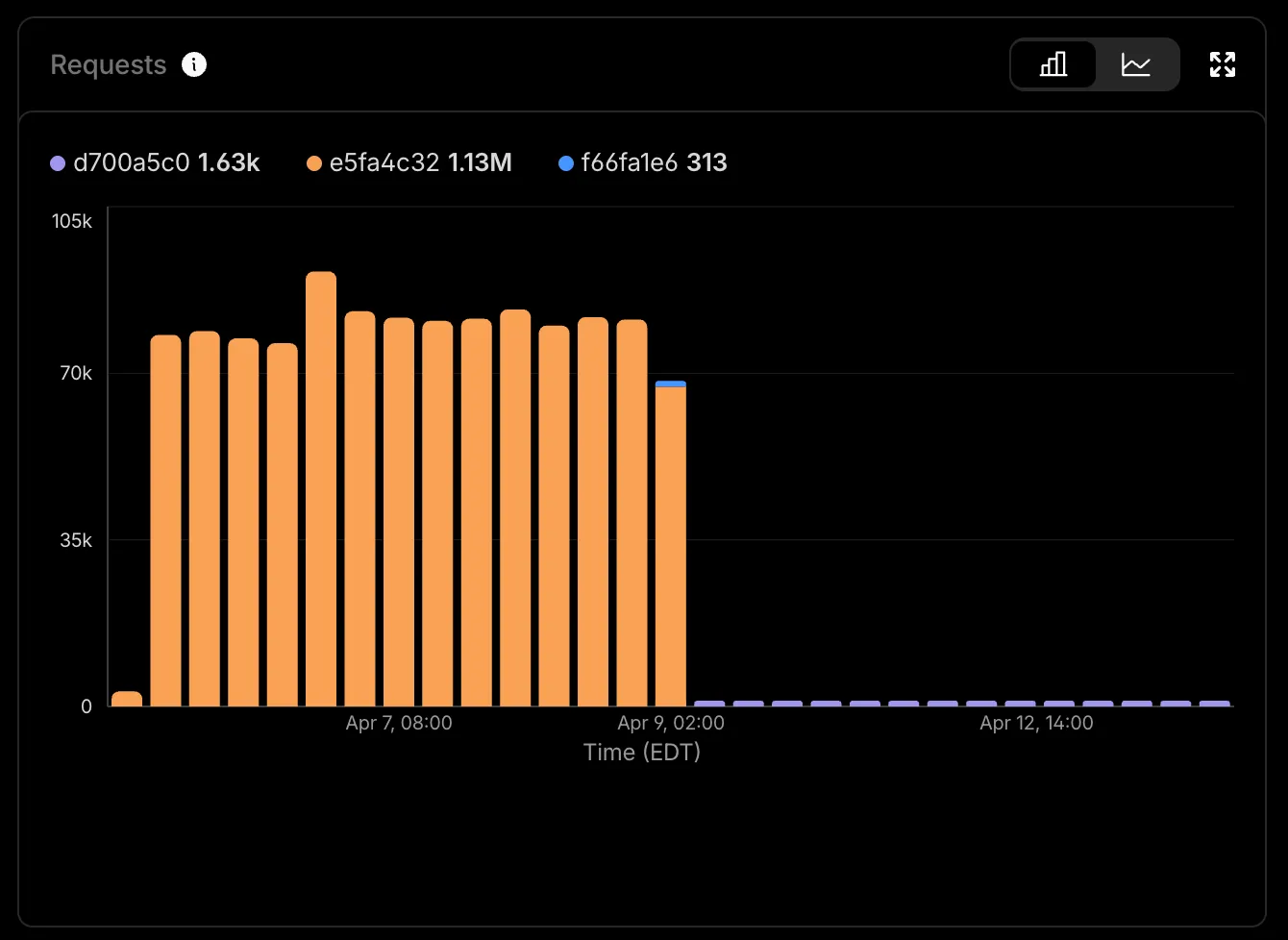
Now Docs.surf runs on a single Cloudflare account that only costs $5 a month. It was so refreshing to find a solution that fit my particular use case with the help of the atproto community.
Wrapping Up
One thing I do want to make clear is that this setup will probably not work for everyone; I had a very specific goal in mind that only requires a partial index. However I hope it does shed some light on the tools out there and the challenges you may face with them. There are several other tools that I have not had a chance to try yet, including quickslice which uses Jetstream to build a GraphQL API. I’m also sure there are plenty of people out there smarter than me who have ideas on how this could be streamlined. If that is you, please do let me know so I can update this post! At the very least I hope this post piques your interest into atproto and how it can fix a lot of the problems created by closed platforms. We have a long way to go, but we have a fantastic community that is doing the hard work and making it happen.
All the code mentioned is open sourced and is available on tangled