Returning to Neovim
Once again coming back to the editor I can't shake

One of my more popular blog posts was how and why I switched to Zed from Neovim. That was almost two years ago, and in that period Zed was my daily driver for programming. Every now and then I would still use Neovim to edit a config or make a quick edit, but outside of that, Zed was where I lived. It performed admirably, with minimal bugs that only irked me from time to time that would eventually be fixed. AI was still relatively minimal and I enjoyed using it. So why go back to Neovim?
What Happened
The real shift happened about a week ago when Zed updated its terms and policies, including a new age restriction of 18+. The Zed team clarified that this was in regards to their online services and platform used for AI assisted coding, but at least for me, it was still a bit unnerving. A few people had already made forks of Zed through the open source licenses that the editor is under, and I did try them, but it was clear that the Zed experience was not the same. Some stuff didn’t work, extensions had to be installed manually, just overall a horrible experience.
That was the wake up call. I realized I couldn’t really trust Zed moving forward. I really think the team is awesome and what they’re building is perhaps the best editor alternative to VSCode, but I also understood that they have to make money somehow. When it comes to writing code, the last place I want to find myself in is being held hostage or being forced off the platform. I have to be able to write code productively without my flow being interrupted by the decisions of higher management. Neovim isn’t a perfect drop in replacement in this regard either, but I trust it way more as a community backed and managed project.
Since switching back to Neovim full time, I’ve honestly had no regrets. I updated my config last year, and having the opportunity to daily drive it has proven how capable it truly is. There was a mental plan to adjust pieces to meet what I might have missed in Zed, but I haven’t had to make any changes yet. With that said I figured it would be a good time to share what my config looks like and how effective it is.
The Config
There’s generally two ways people end up configuring Neovim. One path is using a distro like LazyVim, the other is writing it from scratch. I’ve taken the distro path before and I think it’s great if you have no idea what you want, but eventually you might find yourself wanting to slim things down. If doing a config from scratch feels intimidating, I would highly recommend this series which goes over all the different aspects of a config. Below is a quick overview of my config structure:
nvim
└── lazy-lock.json
└── lua
    └── plugins
        └── ai-vim.lua
        └── treesitter.lua
        └── mini.lua
        └── tmux-navigator.lua
        └── colorschemes.lua
    └── config
        └── options.lua
        └── keymaps.lua
        └── autocmds.lua
    └── core
        └── lazy.lua
        └── lsp.lua
└── lsp
    └── gopls.lua
    └── solc.lua
    └── asm-lsp.lua
    └── rust-analyzer.lua
    └── astro.lua
    └── html.lua
    └── json.lua
    └── lua_ls.lua
    └── tsserver.lua
└── init.lua
I’ll do my best to go over all of the different pieces I have here.
Plugin Manager
I’ve been using lazy.nvim for years (not to be confused with LazyVim, a distro that uses lazy.nvim), and it’s just solid. Always works, zero issues, and boy it can go fast (will go over that later). There’s not much else to say due to how much of an industry standard it is. I might give the new native plugin manager coming in Neovim 12 a try, but I’ve already seen some people say it’s not as fast as lazy.nvim, so I’ll be keeping an eye on it for future development.
LSP
The Language Server Protocol (LSP) provides a standard for different languages to provide feedback in dev workflows. Common example would be writing an incorrect type in Typescript which would cause the compiler to fail. Instead of having to run it, the editor shows some red lines saying something is wrong. Many editors set this up behind the scenes, but that’s not the case for Neovim, and it can be one of the big things people struggle with. In the past I’ve used a few plugin combinations which were always a mess, but I was so excited that native LSP support came to Neovim last year! This video does a fantastic job walking you through how to set it all up, but its really as simple as creating a dedicated lsp folder with the different languages, then making a lsp.lua config file. Here’s an example for Rust:
return {
	cmd = {
		"rust-analyzer",
	},
	filetypes = {
		"rust",
	},
	root_markers = {
		"Cargo.toml",
		"Cargo.lock",
		".git",
	},
	settings = {
		["rust-analyzer"] = {
			cargo = {
				allFeatures = true,
				loadOutDirsFromCheck = true,
				runBuildScripts = true,
			},
			-- Add other rust-analyzer specific settings here
			checkOnSave = true,
			procMacro = {
				enable = true,
				ignored = {
					leptos_macro = {
						-- "component",
						"server",
					},
				},
			},
		},
	},
	single_file_support = true,
	log_level = vim.lsp.protocol.MessageType.Warning,
}
This tells Neovim what files to use the rust-analyzer LSP for, what files might indicate a project, and any other options we may want to add. We follow the same structure for all languages or frameworks that have an LSP. Then inside lsp.lua we just add the following configuration:
vim.lsp.enable({
"astro",
"gopls",
"lua_ls",
"tsserver",
"rust-analyzer",
"asm-lsp",
"solc",
"html",
"json"
})
vim.diagnostic.config({
virtual_lines = false,
-- virtual_text = true,
underline = true,
update_in_insert = false,
severity_sort = true,
float = {
border = "rounded",
source = true,
},
signs = {
text = {
[vim.diagnostic.severity.ERROR] = " ",
[vim.diagnostic.severity.WARN] = " ",
[vim.diagnostic.severity.INFO] = " ",
[vim.diagnostic.severity.HINT] = " ",
},
numhl = {
[vim.diagnostic.severity.ERROR] = "ErrorMsg",
[vim.diagnostic.severity.WARN] = "WarningMsg",
},
},
})The key is vim.lsp.enable() where we pass in the names of all our files that have configs. Everything else is just some nicer configuration for looking at diagnostics.
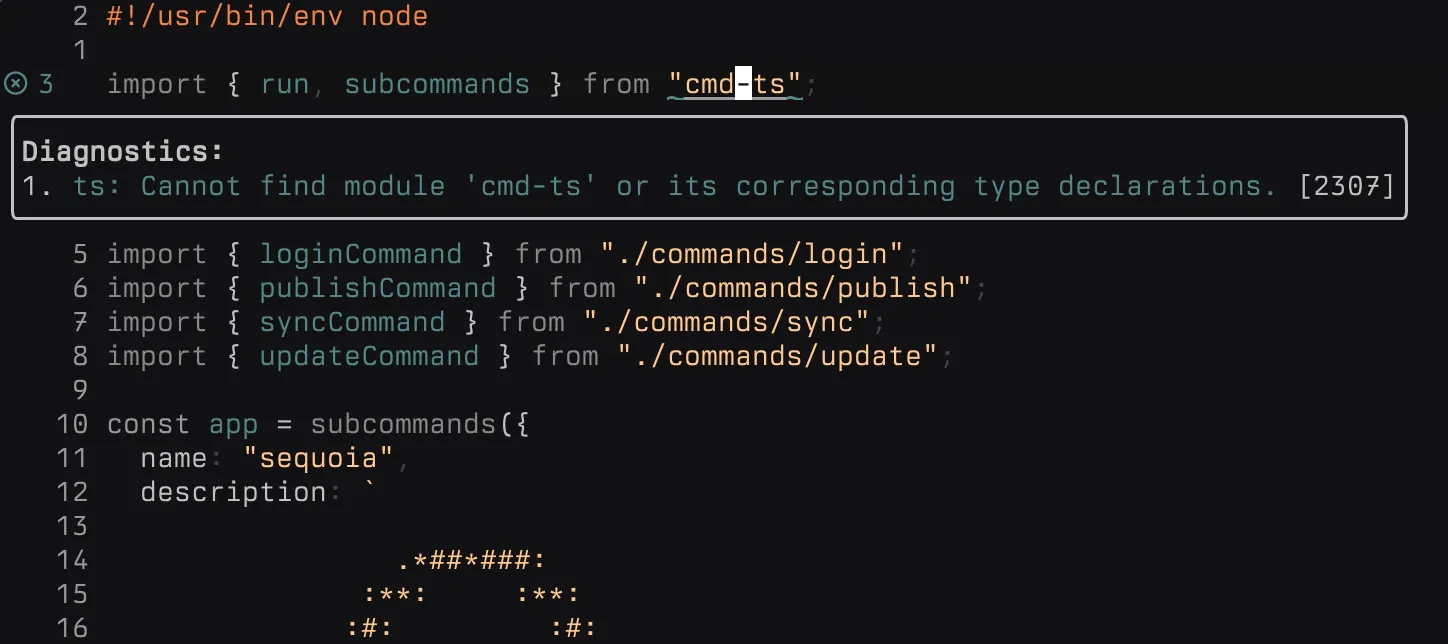
It’s that simple, and I absolutely love how minimal the experience is. Does require understanding what your LSPs are, where they live, and how to run them, but totally worth it.
Plugins
You might have noticed that I don’t have that many plugins, but it’s actually a bit deceiving.
ai-vim.lua- Small inline AI editing plugin which I don’t actually use much, will probably cut it.treesitter.lua- Syntax highlighting, pretty standard.tmux-navigator.lua- Lets me usectrl+h/j/k/lto switch between a Neovim session and another tmux pane.colorschemes.lua- Themes baby, currently on my own called Darkmatter
The one I didn’t list here is mini.nvim, which is the true star of this config. mini.nvim is a collection of minimal plugins that are installed and setup through a single config. They’re all simple, functional, and they really help lighten up your config. Here’s a quick run down of some of my favorites.
mini.completion
This would normally be handled through something heavier like coc.nvim, but it’s truly awesome to have a simple and lightweight option inside mini.nvim.
mini.files
A minimal file explorer thats a fun mix between oil and netrw.
mini.pick
Pick anything. Actually though. In a lot of ways this replaces telescope and lets me fuzzy find files, buffers, you name it!
Other Bits
There are some smaller quality of life pieces I have that don’t really fit into any specific category, so here’s a few my favorites.
VimEnter
I got this one from Adib Hanna a long time ago. Instead of showing a start screen when I open Neovim, instead I use mini.pick to fuzzy find all files within the current directory.
vim.api.nvim_create_autocmd("VimEnter", {
  callback = function()
    if vim.fn.argv(0) == "" then
      vim.defer_fn(function()
        require("mini.pick").builtin.files()
      end, 100) -- Wait 100ms
    end
  end,
})
Buffer Management
I don’t have tabs setup in Neovim as I started to realize I don’t really need them. I can use my keyboard shortcuts to move between buffers horizontally,
-- Navigate buffers
map("n", "<S-l>", ":bnext<CR>", opts)
map("n", "<S-h>", ":bprevious<CR>", opts)
or filter through them with mini.pick:
map("n", "<leader>o", "<cmd>Pick buffers<CR>", opts)Then I can just close them with the following keymap:
map("n", "<leader>c", ":bd<cr>", opts)Diagnostics
Nothing too fancy here but it is nice how versatile the experience can be. I can either use this keymap to do a hover diagnostic:
map("gl", vim.diagnostic.open_float, "Open Diagnostic Float")Or I can view all diagnostics for the project with mini.pick:
map("n", "<leader>d", "<cmd>Pick diagnostic<CR>", opts)Finding Stuff
One of the most important things an editor needs is an easy way to find anything, and I’m quite pleased with what I have setup here. To start, if I wanted to search the entire codebase for a given string, I can use mini.pick with live_grep.
map("n", "<leader>/", "<cmd>Pick grep_live<CR>", opts)Same goes for buffers.
map("n", "<leader>o", "<cmd>Pick buffers<CR>", opts)For files, I can either do a fuzzy find like so:
map("n", "<leader>f", "<cmd>Pick files<CR>", opts)Or I can use the file browser with mini.files.
map("n", "<leader>e", "<cmd>lua MiniFiles.open()<CR>", opts)Last but not least, you can also use Pick to get all the help manuals for Neovim or the plugins installed.
map("n", "<leader>hh", "<cmd>Pick help<CR>", opts)Speed
025.359  000.037: BufEnter autocommands
025.363  000.004: editing files in windows
025.381  000.019: --- NVIM STARTED ---
This configuration is incredibly fast. Startup times averages around ~25ms. A more detailed report can be found below.
Source
By all means feel free to checkout the whole config yourself in my dotfiles repo!
Wrapping Up
I really do appreciate the time I had with Zed and it is a solid editor; I don’t fault anyone who uses it. Personally I’ve just been through this kind of thing too many times, where I thoroughly enjoy and depend on a tool, just for it to go sideways and absolutely cripple my productivity. The Arc Browser was a great example of this. I would much rather jump ship early, figure out a new workflow that is dependable, and stick with it. That’s exactly what I’ve done with Neovim, and it’s good to be back.